Top 10 Open-Source AI Developer Tools You Should Self-Host in 2026
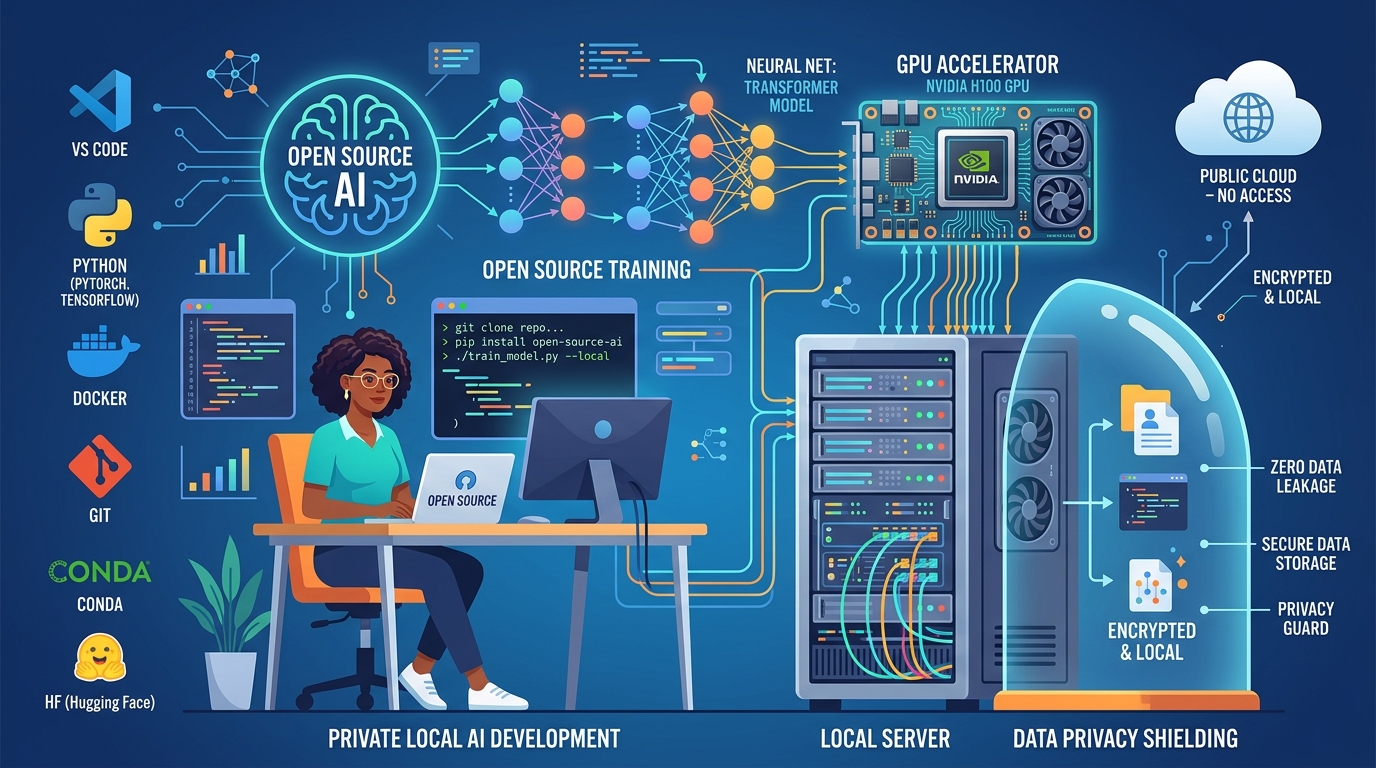
As cloud AI API prices fluctuate and privacy concerns mount, a quiet revolution is happening among software developers: more creators and technical freelancers are migrating mission-critical AI workloads to self-hosted, open-source stacks.
Self-hosting AI tools gives you three decisive competitive advantages:
- Zero Token Fees: Run millions of inferences on local hardware or flat-rate cloud virtual machines without worrying about surprise per-token billing spikes.
- 100% Data Privacy & Compliance: Proprietary client source code, confidential business data, and customer records never leave your infrastructure.
- Customizable Weights & Adapters: Fine-tune lightweight models (such as Llama 3.1, Mistral, or Qwen) with domain-specific documentation, coding styles, or internal guidelines.
Whether you are running a modest developer workstation with an NVIDIA GPU or setting up a dedicated server for client projects, here are the top 10 open-source AI developer tools you should consider self-hosting in 2026.
1. Ollama: The De Facto Local Inference Engine
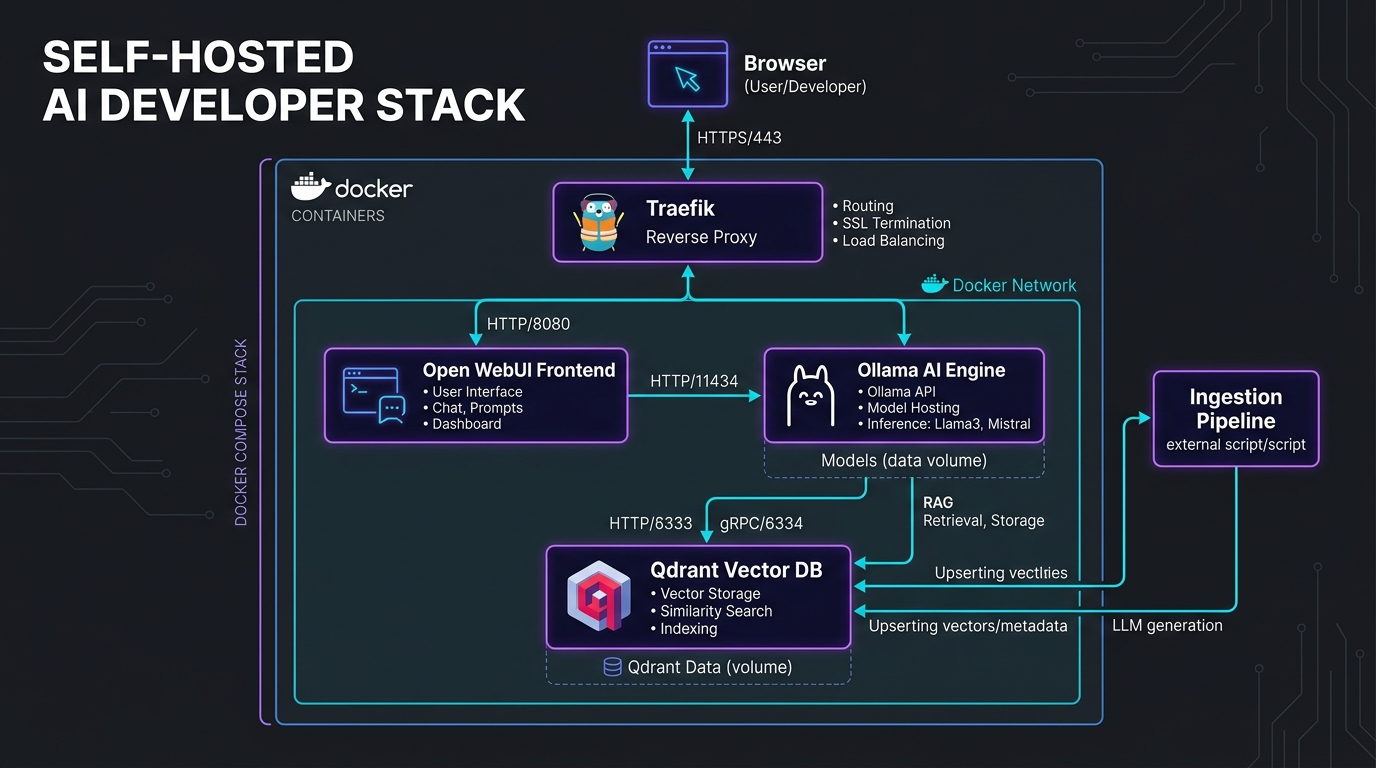
Ollama remains the standard for running open-weight LLMs locally with zero configuration hassle. It bundles model weights, runtime configurations, and GPU optimizations into single containerized packages. With a single terminal command (e.g. ollama run llama3.1), you can serve models with an OpenAI-compatible REST API endpoint on port 11434.
Best For: Rapid local prototyping, background inference tasks, and connecting desktop apps to local models.
2. Open WebUI: The Ultimate Self-Hosted ChatGPT Alternative
Formerly Ollama WebUI, Open WebUI is an enterprise-grade, privacy-first interface that mirrors and in many ways surpasses commercial chat experiences. It features multi-model chats, granular role-based access control (RBAC), built-in Retrieval-Augmented Generation (RAG), web search integrations (SearXNG, DuckDuckGo), and full voice interaction.
Best For: Teams and solopreneurs who want a gorgeous, self-hosted web interface to interact with local or self-hosted models.
3. Dify.ai: Full-Stack LLMOps and Visual App Builder
Dify combines visual workflow orchestration, prompt engineering sandboxes, and production agent management into a single platform. Unlike simplistic wrappers, Dify allows you to build sophisticated visual pipelines, connect database retrieval, monitor token consumption, and publish clean web apps or APIs in minutes.
Best For: Building complex AI apps, customer support bots, and internal workflow automation for freelance clients.
4. Continue.dev: Open-Source AI Code Assistant for VS Code & JetBrains
If you want GitHub Copilot capabilities without transmitting client code to external servers, Continue is the undisputed leader. It integrates natively into VS Code and JetBrains IDEs, enabling tab-autocomplete, in-line code edits, repository-wide indexing, and doc generation powered by local models running on Ollama or remote vLLM clusters.
Best For: Software developers working under strict NDA or privacy contracts.
5. LiteLLM: Unified Proxy & Load Balancer for 100+ Models
LiteLLM acts as an intelligent proxy server that translates all upstream LLM APIs into standard OpenAI-compatible formats. It provides automatic fallback routing (e.g. if Claude 3.5 hits a rate limit, gracefully switch to GPT-4o or a self-hosted Llama instance), budget alerting, latency tracking, and spend analytics across teams.
Best For: Managing API reliability and eliminating vendor lock-in across multiple software projects.
6. vLLM: High-Throughput Production Inference Engine
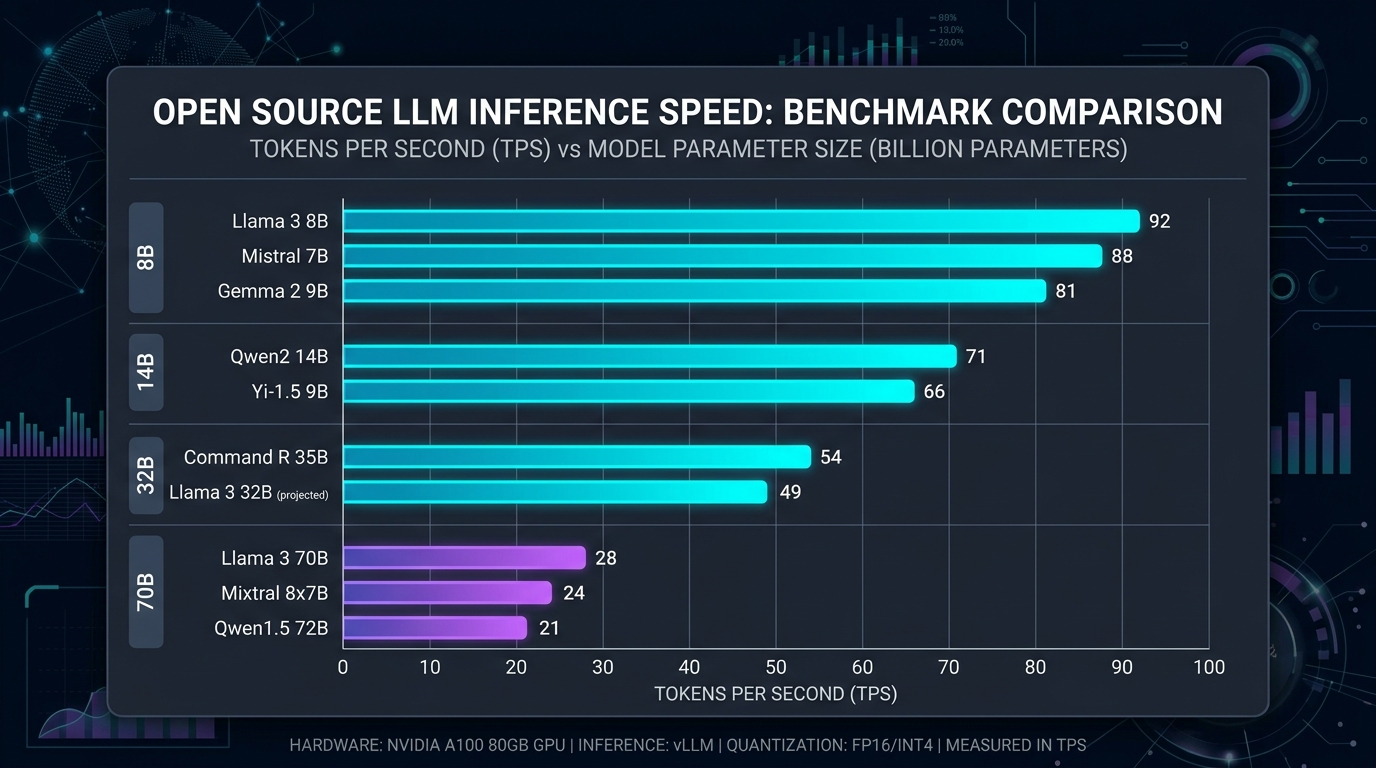
When you need to serve high-volume concurrent requests to clients or web visitors, standard Python runtimes choke. vLLM solves this with PagedAttention—an intelligent memory allocation algorithm that optimizes GPU VRAM usage. It delivers up to 10x-24x higher throughput compared to default Hugging Face pipelines.
Best For: Production deployments serving multiple users or customer-facing applications on a dedicated GPU server.
7. AnythingLLM: Turn Any Folder, PDF, or Site into a Smart RAG Agent
AnythingLLM is an all-in-one desktop and Docker application that democratizes Retrieval-Augmented Generation. You simply drag and drop PDF manuals, code folders, or WordPress export files, choose your preferred embedding provider and vector database (LanceDB, Chroma), and start querying your documents with pinpoint citation accuracy.
Best For: Document analysis, technical research, and building customized private knowledge bases.
8. Langfuse: Open-Source Observability & Prompt Management
Debugging multi-step AI chains can feel like operating in the dark. Langfuse gives you full observability over your LLM applications: trace execution steps, measure per-step latency, evaluate prompt version performance, monitor exact cost breakdowns, and log user feedback scores.
Best For: Production engineering teams and serious automation developers who need detailed logging and regression testing.
9. LocalAI: Drop-In REST Replacement for OpenAI APIs
LocalAI serves as a direct drop-in replacement for OpenAI API endpoints, supporting text generation, audio transcription (Whisper), text-to-speech, and image generation (Stable Diffusion). It runs smoothly on commodity consumer hardware without requiring dedicated NVIDIA GPUs, utilizing CPU acceleration (AVX) if needed.
Best For: Developers running diverse multimodal models on heterogeneous or CPU-only hardware.
10. Khoj: The Personal AI Second Brain
Khoj connects seamlessly with your personal digital ecosystem—Emacs, Obsidian, GitHub, WhatsApp, and browser history. It allows you to query your past notes, search bookmarked code snippets, and generate structured summaries using semantic search powered by local vector indexes.
Best For: Personal knowledge management, developer journaling, and rapid information retrieval.
Self-Hosted Hardware Requirements: What Do You Actually Need?
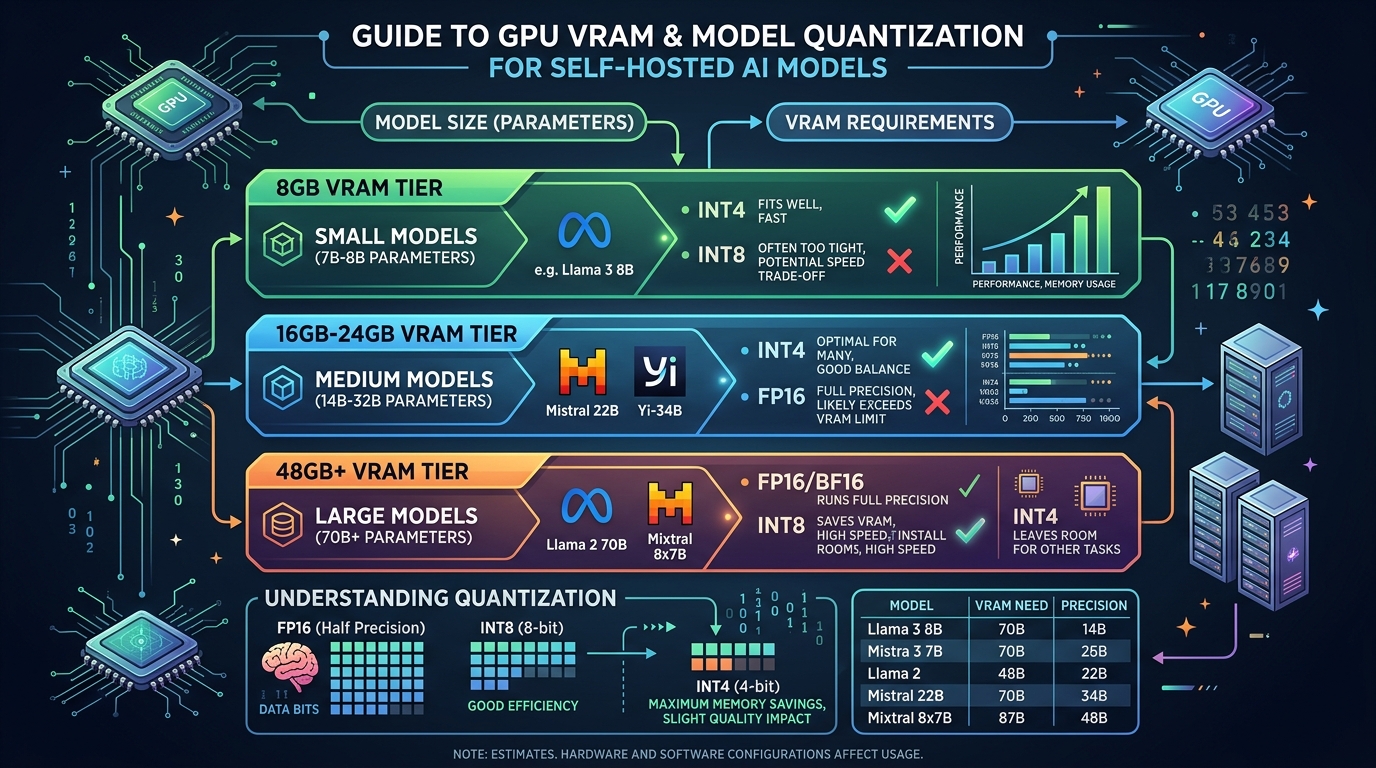
| Workload Scale | Recommended Model Parameters | Minimum Hardware Requirements | Approximate Monthly Hosting Cost |
|---|---|---|---|
| Light Prototyping | 7B – 8B parameters (Q4 Quantized) | 16GB RAM + 8GB VRAM (e.g. RTX 3060/4060 or Apple M-series) | $0 (Local PC) |
| Standard Studio | 14B – 32B parameters (Q4/Q8 Quantized) | 32GB RAM + 16GB–24GB VRAM (RTX 3090 / 4090 or RunPod VPS) | $35 – $75/mo (Cloud VPS) |
| Heavy Production | 70B+ parameters or concurrent multi-user | 64GB+ RAM + Dual 24GB GPUs (2x RTX 3090 / A5000) | $120 – $250/mo (Dedicated GPU Server) |
Final Verdict: How to Get Started Today
You don’t need a high-end data center to begin your self-hosted AI journey. Start by installing Ollama on your current workstation, pair it with Open WebUI in a Docker container, and install the Continue extension in your code editor. In less than 30 minutes, you will have a private, subscription-free AI coding and research environment completely under your control.