How to Build a Custom AI Agent to Automate Daily Tasks (No-Code Guide 2026)
Most people use AI as an interactive conversational partner: they open a chat interface, type a prompt, wait for an answer, and manually copy-paste the output into an email or a spreadsheet. While that saves a few minutes, it barely scratches the surface of what artificial intelligence can actually do for your daily workflow.
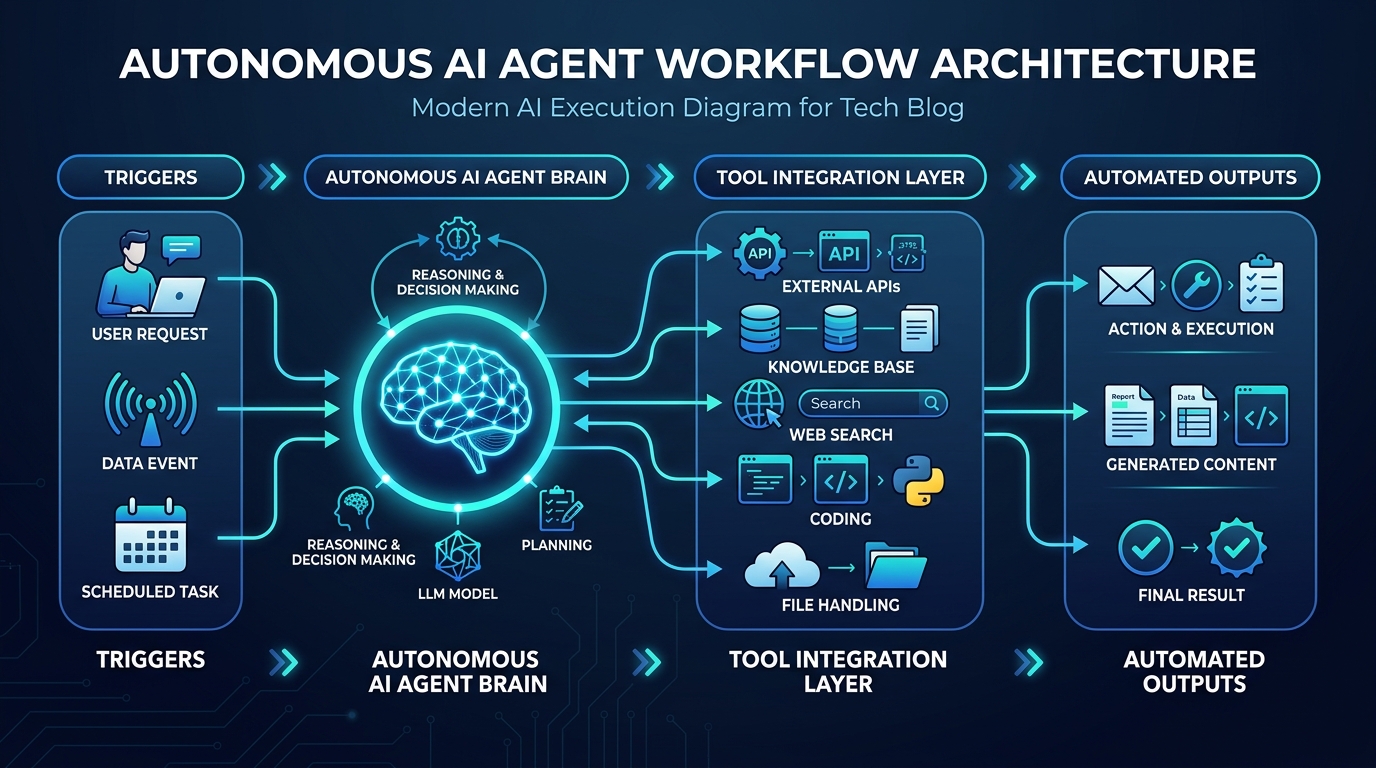
In 2026, the real productivity leap belongs to autonomous and semi-autonomous AI agents. Unlike standard chatbots that simply reply to user prompts, an AI agent can perceive an event (a trigger), reason through a series of logical steps, query external software tools via APIs, verify its own work, and execute end-to-end tasks without manual babysitting.
The best part? You no longer need a degree in machine learning or thousands of lines of Python code to build one. Modern no-code automation platforms allow creators, freelance professionals, and small business owners to assemble resilient AI agents in under an hour. In this comprehensive guide, we will walk through the architecture, tools, step-by-step build process, and testing strategies required to launch your first custom AI agent.
Chatbot vs. AI Agent: Understanding the Core Difference
Before assembling any workflows, it is essential to understand the architectural distinction between a conventional conversational LLM and an active agent:
| Capability Dimension | Traditional Chatbot (e.g. Basic ChatGPT) | Autonomous AI Agent (e.g. n8n / Make + LLM) |
|---|---|---|
| Trigger Method | Requires active human input for every single query | Event-driven (incoming email, webhook, calendar alert, scheduled cron) |
| Action Execution | Outputs text on a screen; cannot touch outside software | Executes real actions (creates database records, sends emails, calls APIs) |
| Tool Utilization | Restricted to built-in browser/search functions | Can connect to Google Sheets, WordPress, CRM, Slack, Notion, Stripe |
| Multi-Step Reasoning | One prompt in, one answer out | Loops through sub-tasks, checks conditions, corrects errors autonomously |
| Context Persistence | Lost once the chat thread expires or gets too long | Stores long-term memories and audit logs in external databases (Supabase, Airtable) |
The 4 Essential Components of Any AI Agent Architecture
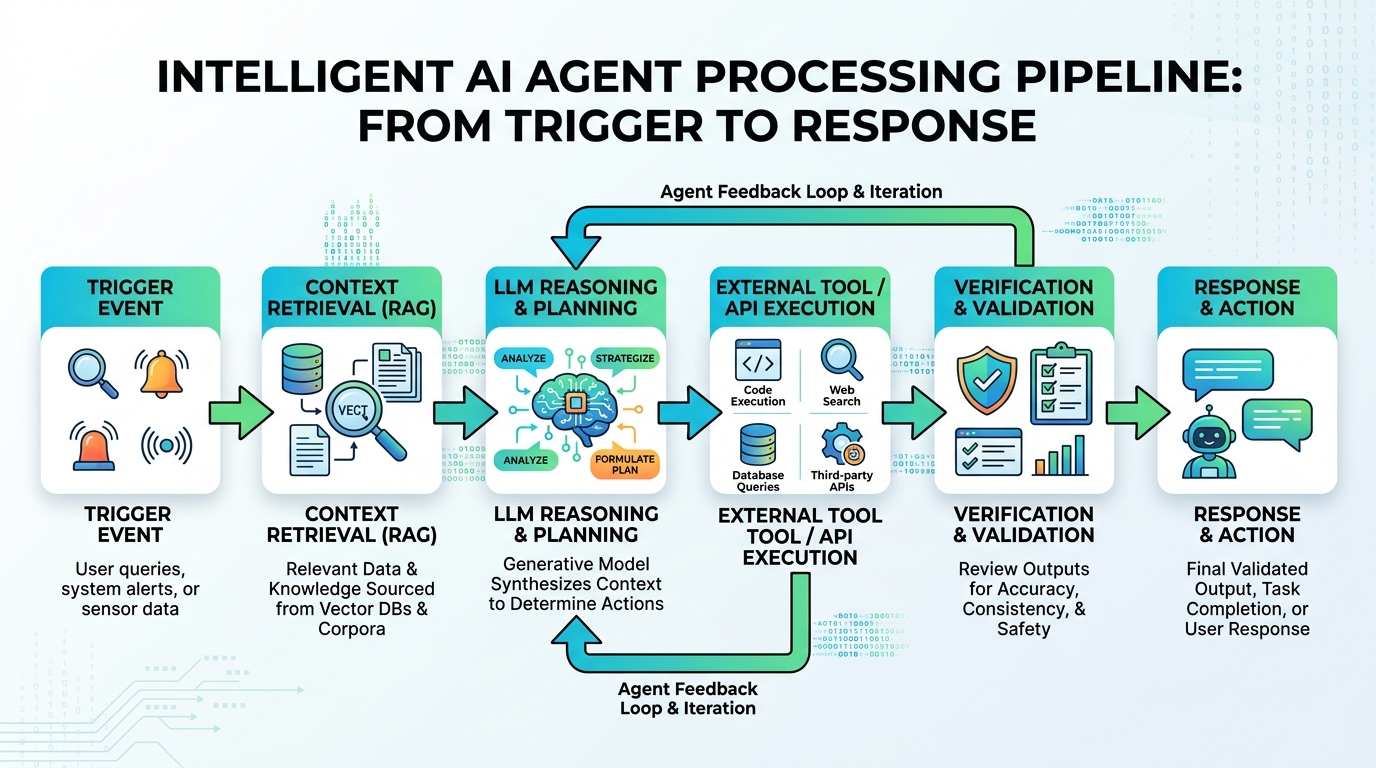
Regardless of which no-code platform you choose, every functional agent consists of four interconnected pillars:
- The Sensor (Trigger): The sensory receptor that alerts your agent that work has arrived. Common triggers include receiving an email with a specific subject line, a form submission on a WordPress website, a new row added to a Google Sheet, or an hourly timer.
- The Brain (Reasoning Engine): The underlying large language model (such as Claude 3.5 Sonnet, GPT-4o, or an open-weight model like Llama 3). The reasoning engine is given a strict system prompt defining its role, boundaries, input format, and output schema.
- The Hands (Tool Integration): The programmatic actions the agent is allowed to execute. For example, if you build a customer support agent, its tools might include SearchKnowledgeBase(), CheckOrderStatus(), and CreateSupportTicket().
- The Memory (State Store): Short-term memory keeps track of what happened earlier in the workflow, while long-term memory (often backed by a vector database or relational table) ensures the agent remembers returning clients or recurring project parameters.
Choosing Your No-Code Agent Stack in 2026
There are several outstanding visual orchestration platforms available today. Here are the top three recommended for creators and freelancers:
1. n8n (Best Overall for Power, Privacy, and Value)
n8n has become the gold standard for automation engineers. It offers a dedicated “AI Agent” node with built-in support for LangChain-style tools, conversational memory, vector store loaders, and output parsers. You can either use their managed cloud service or self-host it completely free on a $5/month VPS (Virtual Private Server), giving you total privacy over client data.
2. Make.com (Best for Visual UI and Beginners)
Make (formerly Integromat) provides an exceptionally smooth drag-and-drop canvas. Its native OpenAI and Anthropic apps allow you to parse data structures, extract structured JSON, and route complex branching logic visually. It is ideal if you prefer a fully managed cloud ecosystem with zero server maintenance.
3. Flowise AI (Best for Dedicated Agentic Graphs)
Flowise is an open-source visual user interface specifically built on top of LangChain and LlamaIndex. If you want to connect document repositories (PDFs, Notion docs) to an agent that reasons using multi-agent supervisory hierarchies, Flowise is unbeatable for pure conversational knowledge tasks.
Step-by-Step Build: Constructing an AI Lead Research & Qualification Agent
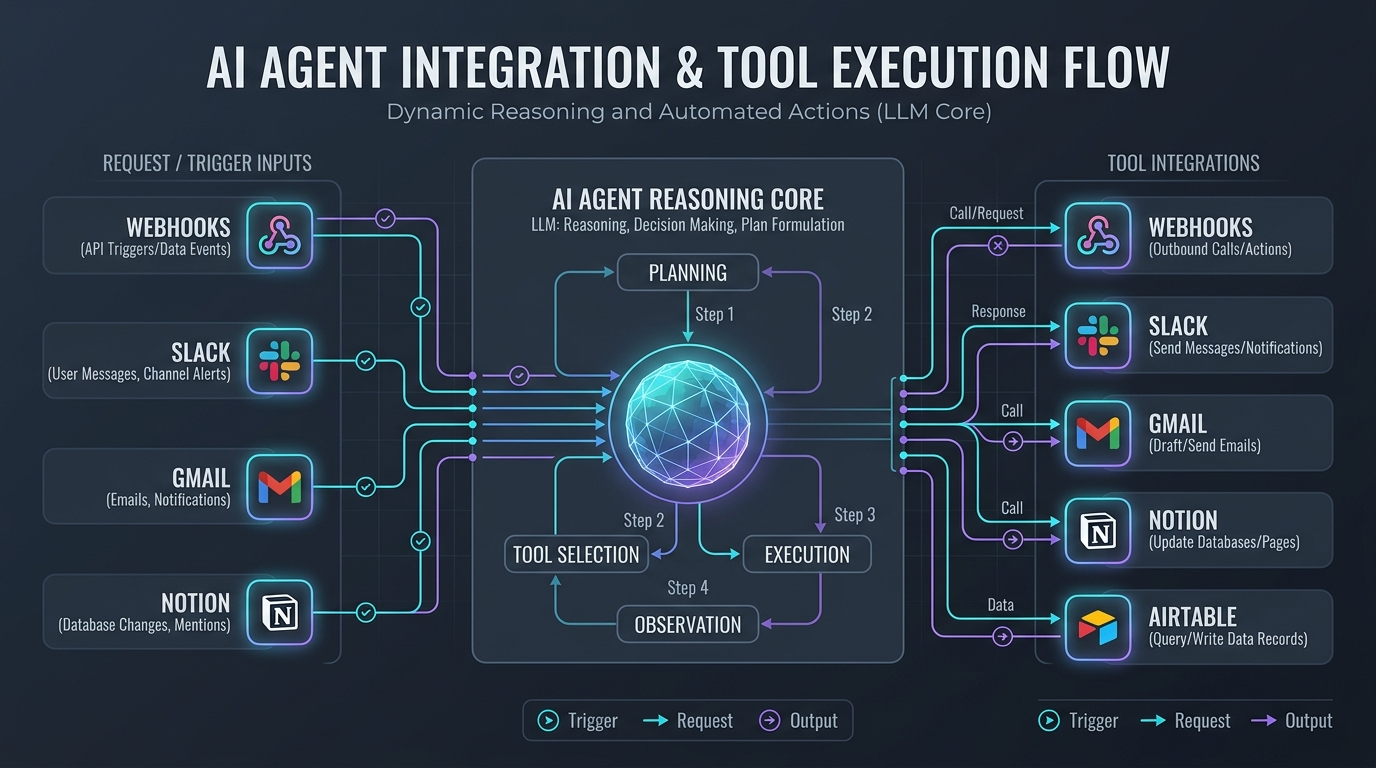
To see how this works in practice, let’s construct a real-world agent that freelancers and agency owners can deploy immediately: An Automated Inbound Lead Qualification Agent.
The Goal: When a prospective client fills out your contact form, the agent will analyze their website and project scope, verify if their budget fits your minimum threshold, score the lead from 1 to 10, write a personalized briefing document for you, and automatically draft a custom reply in your email inbox.
Step 1: Set Up the Webhook Listener
In your automation tool (we’ll use n8n for this example), create a new workflow and add a Webhook Trigger node. Configure the webhook to receive HTTP POST payloads from your website’s contact form plugin (e.g. WPForms, Fluent Forms, or Gravity Forms). The payload contains: Client Name, Email, Company URL, Project Description, and Budget Range.
Step 2: Equip the Agent with a Web Scraper Tool
Under the AI Agent node, attach a custom tool using the HTTP Request node. Configure the tool with a description: Use this tool to fetch the homepage HTML and meta description of the prospect's company URL to understand what their business sells.
Step 3: Formulate the System Directive (The Agent Prompt)
The reasoning capability of your agent hinges on precise system prompt design. Avoid vague instructions. Use structured role definitions and explicit scoring rubrics:
You are an executive business development assistant for a premium web engineering agency.
Your task is to review incoming project inquiries and qualify them based on our criteria.

QUALIFICATION CRITERIA:
1. Budget Fit: Target project budget is $1,500 - $10,000. Under $500 is disqualified.
2. Technical Match: We specialize in WordPress, WooCommerce, custom API integrations, and AI automations.
3. Clarity: High-scoring inquiries articulate a specific business challenge rather than vague single-line messages.

EXECUTION PROCEDURE:
- Step 1: Use the WebScraper tool to inspect the prospect's URL if provided.
- Step 2: Calculate a Lead Score between 1 and 10 with a bulleted rationale.
- Step 3: Output a structured JSON object containing: lead_score, summary, recommendation (Accept/Decline/Follow-up), and email_draft.
Step 4: Enforce Structured Output JSON Schema
One common pitfall with AI workflows is unpredictability in output formatting. By attaching an Auto-Fixing Output Parser or enabling JSON mode, you ensure the LLM returns strict machine-readable keys rather than conversational chatter. This guarantees downstream database nodes can process the variables without breaking.
Step 5: Route Actions Based on Agent Decision
Connect a conditional If / Switch node after the AI Agent block:
- If Lead Score >= 7 (High Value): The agent sends a high-priority alert to your private Slack or Telegram channel with the executive summary, logs the record in Notion, and creates a pre-filled draft email in your Gmail/Outlook account ready for your 1-click review.
- If Lead Score < 4 (Low Fit / Spam): The agent archives the lead in an archive spreadsheet and sends a polite automated template directing them to your public starter resources.
Crucial Safety Rules for Production AI Agents
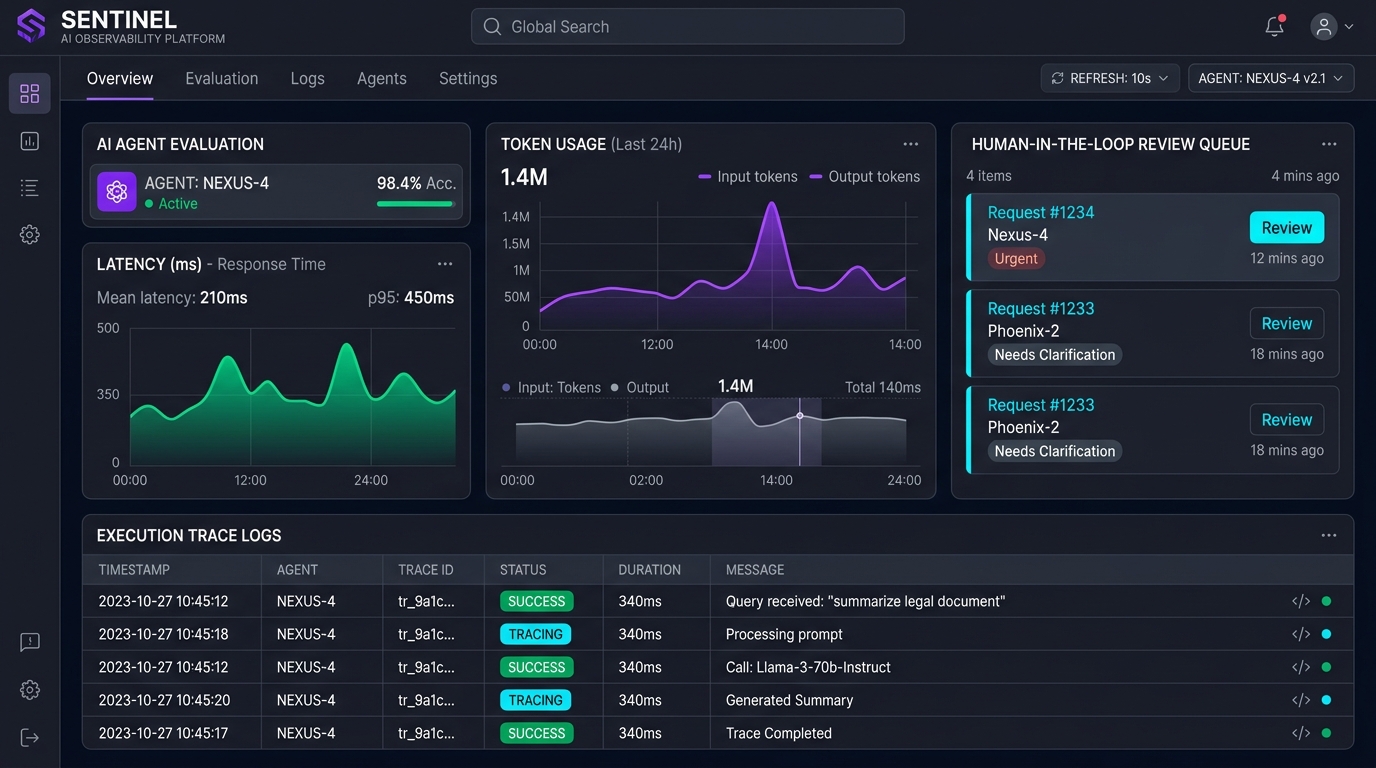
When transitioning an agent from a sandbox experiment to real-world tasks, keep these golden safety principles in mind:
- Human-in-the-Loop (HITL) for External Communications: Never allow an AI agent to send emails directly to external clients without human verification during your initial weeks. Save outputs as “Drafts” so you can spot hallucinations before real people see them.
- Hard Rate Limits & Budget Caps: Always configure max execution iteration loops (e.g. max 5 tool executions per run) to prevent the agent from getting caught in recursive self-prompting loops that consume your API budget.
- API Key Isolation: Grant your agent access only to least-privilege API tokens. For instance, if the agent only needs to read spreadsheet rows, generate a read-only token rather than an unrestricted administrative key.
Summary & Next Steps
Building custom AI agents is one of the highest-leverage skills you can develop in 2026. By offloading repetitive triage, data enrichment, research summarization, and content formatting to intelligent autonomous workflows, you free up dozens of productive hours every month to focus on high-value client strategy and creative development.
Start small: pick one repetitive 20-minute daily chore, map out its trigger and tools, and build a single-purpose agent to handle it. Once you master the fundamentals of triggers, tool schemas, and structured outputs, you can scale to complex multi-agent collaborative networks.